Tax season shouldn’t start with a hunt for your paperwork. Your Dollar General W-2 is released by January 31 each year, and you can download it online in a few minutes — if you know which portal it’s on. This guide covers where your DGME W2 actually lives, how former employees can still get theirs, what each box on the form means, and what to do when the form never shows up.
Most current employees log in at webapps.dolgen.net/dgme2 using their 8 digit Employee ID and password. Paystubs and W2 live on a separate system at paystubportal.com/dollargeneral. Pick the matching card below so you land on the right one the first time.
When is the Dollar General W-2 available?
- Employers are required to issue W-2s by January 31, and Dollar General posts them online by that date each year.
- If you chose mail delivery, the paper copy goes to the address on file — so an old address is the number one reason mailed W-2s go missing.
- If nothing has arrived by mid-February, it’s time to act (steps below).
How to download your DGME W2 — current employees
- Go to paystubportal.com/dollargeneral.
- Sign in with your Employee ID (EID) and password or PIN.
- Open the Tax Forms or W-2 section on your dashboard.
- Select the tax year you need.
- Download the PDF or print it for filing.
Tip: Download a copy even if you also get one by mail. A saved PDF means you’ll never have to chase a duplicate later.
Former employee? Here’s how to get your W-2
Left Dollar General? You still get a W-2 for every year you earned wages there. Try these in order:
- Try your old login first. Portal access often stays active for a while after your last day — sign in at paystubportal.com/dollargeneral with your old EID and password.
- Reset if expired. Use Forgot Password and verify with the last four digits of your SSN.
- Call the Employee Response Center at 1-888-237-4114. Explain you’re a former employee who needs a W-2 — they can verify your identity and either restore access or arrange a copy.
- Check your mail. Dollar General mails W-2s to your last address on file by January 31. If you’ve moved since leaving, contact HR or payroll to update the address and request a re-send.
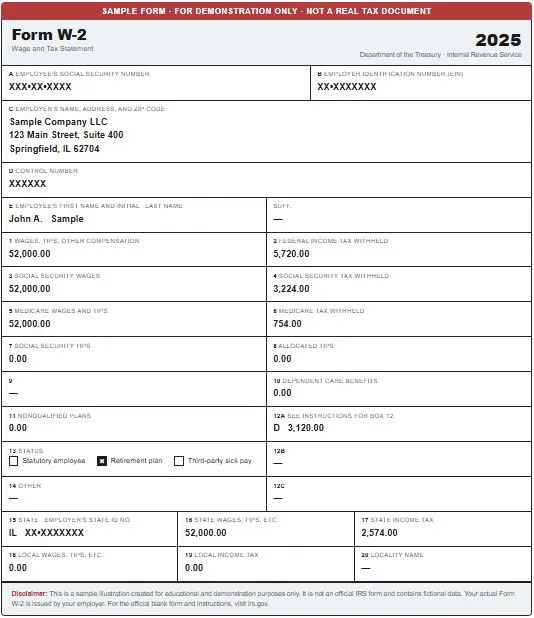
What each box on your W-2 means
Most guides stop at “download it” — but reading the form correctly matters when you file:
- Box 1 — Wages for federal income tax. This is often lower than what you think you earned, because pre-tax deductions like 401(k) contributions are subtracted.
- Box 2 — Federal income tax already withheld from your paychecks during the year.
- Boxes 3–6 — Social Security and Medicare wages and taxes. Box 3 can be higher than Box 1, which confuses people every year — that’s normal, because 401(k) money is still subject to Social Security tax.
- Boxes 15–17 — State wages and state tax withheld. If you worked at stores in two states during the year, you may see multiple state lines or receive more than one W-2.
- Box 12 codes — letters like D (401k contributions) or DD (employer health coverage cost). Code DD is informational only; it doesn’t change your taxes.
W-2 has a mistake? Ask for a W-2c
If your name, SSN, or wage amounts are wrong, don’t file with incorrect numbers. Contact Dollar General HR or payroll and request a corrected W-2 (called a W-2c). Filing with a wrong SSN or mismatched wages can delay your refund far longer than waiting for the correction.
Still no W-2 by mid-February?
Work through this order:
- Confirm your address with Dollar General HR and request a duplicate.
- Check the portal again — the online copy is usually available even when the mailed one is lost.
- Call the Employee Response Center (1-888-237-4114) if you’re a former employee without portal access.
- As a last resort, the IRS can help: after late February you can contact the IRS, and if the form still never arrives, you’re allowed to file using Form 4852 (a substitute W-2) based on your final pay stub. This is exactly why saving your last pay stub of the year matters.
Never pay for your W-2
Your W-2 is always free — from the portal, by mail, or as a duplicate from HR. Any website asking for a fee, your full SSN, or your portal password to “retrieve your Dollar General W2” is a scam. Only use paystubportal.com, dolgen.net addresses, or Dollar General’s own HR channels.