The clear, verified way to log in to DGME.
If you work at Dollar General, almost everything about your job lives behind one login: your pay stubs, your W-2, your schedule, your time off and your benefits. The problem is that there is more than one Dollar General system, the links look similar, and a search for “DGME login” often lands you on a copycat site instead of the real one. That is where mistakes and stolen passwords happen.
This page fixes that. In plain steps, it shows you exactly which official portal to use for each task, how to get in if you are locked out, and how to spot a fake site before you type a single detail. No guesswork, no credential requests, just the correct link and the next step.
What is DGME?
DGME is the online system Dollar General employees use to handle work tasks without going through HR in person. From your login you can reach your pay stubs, work schedule, W2 tax forms, benefits and personal details, from any device with internet.
It helps to know that DGME is not one single website. It is a set of connected official systems: the main portal on dolgen.net for HR, personal info and your schedule, plus a separate paystub portal for pay and tax forms. Using the right one for each task is exactly what keeps you off copycat sites.
Employees often ask what the letters stand for. DGME is commonly read as Dollar General Market Employee, though Dollar General does not publish an official meaning. What matters is what it does, not the letters.
Most current employees log in at webapps.dolgen.net/dgme2 using their 8 digit Employee ID and password. Paystubs and W2 live on a separate system at paystubportal.com/dollargeneral. Pick the matching card below so you land on the right one the first time.
Which official portal do you need?
| You want to | Use this official portal | Notes |
|---|---|---|
| Schedule, HR info, personal details | webapps.dolgen.net/dgme2 | Sign in with Employee ID and password |
| Pay stubs and W-2 forms | paystubportal.com/dollargeneral | Separate login from the main portal |
| Internal sign on | websso.dolgen.net | You usually reach this automatically |
Anything that is not on dolgen.net or the official paystub portal is not Dollar General. Never enter your Employee ID or password on a lookalike site.
Dollar General support contacts
If you cannot solve something online, these are the official Dollar General lines. Match the reason to the right number so you reach the correct team faster.
| Reason to call | Number | Hours |
|---|---|---|
| Reason to callLogin, password or general HR help | Number1-855-275-3447 (1-855-ASK-DGHR) | HoursMon to Fri, 8am to 5pm CST |
| Reason to callEmployment or pay record verification | Number1-800-678-9258 | HoursMon to Fri |
| Reason to callEmployee Response Center (accommodations and other requests) | Number1-888-237-4114 (option 1) | HoursMon to Fri |
This site is independent and cannot access your account. For anything account specific, use the official lines above or ask your store manager.
Verified official portals
✓ Official Login
DGME employee portal
Schedules, HR info, personal details. Use your Employee ID and password. First time users register here.
✓ Official Pay
Paystub and W-2 portal
paystubportal.com/dollargeneral
View, download and print pay stubs and W-2 tax forms. Works for current and former employees.
✓ Official SSO
Single Sign On
Internal authentication gateway. You usually reach this automatically, not by typing it directly.
✗ Not the Portal
Lookalike domains
dgme.com and random dgme sites
These are not Dollar General. Never enter your Employee ID or password on a domain that is not on dolgen.net or the official paystub portal.
On this page
What you need to log in
Signing in is quick once your account is active. Have these ready:
- Your 8 digit Employee ID (EID)
- Your DGME password
Step by Step
How to log in to the DGME portal
If your account is already active, signing in takes under a minute. Use a desktop or laptop for paystubs and HR documents, since the mobile view sometimes hides the download buttons.
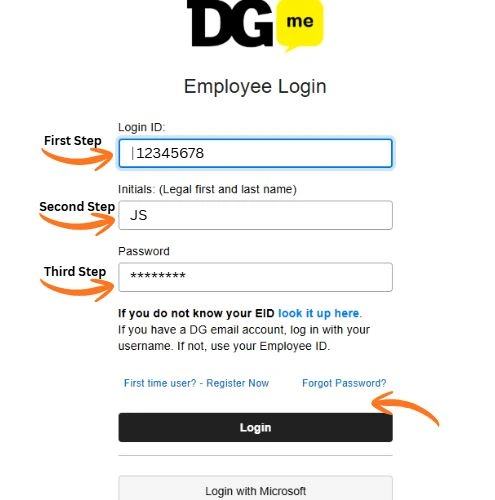
- Open webapps.dolgen.net/dgme2 in your browser.
- Enter your 8 digit Employee ID (EID) in the first field.
- Type your password, then complete any security check that appears.
- Select Sign In to reach your dashboard.
New employees
First time user registration
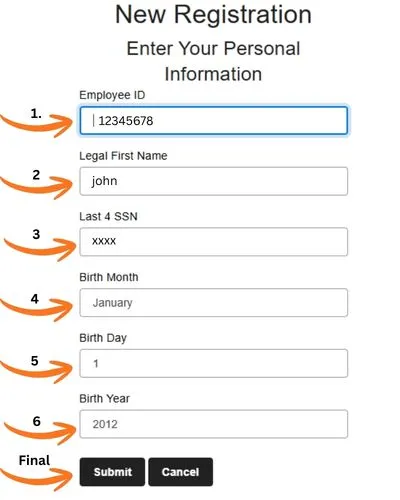
New hires set up access once. Have these ready before you start: Employee ID, legal first name, last four digits of your SSN, and date of birth.
- Open the DGME portal and choose Register Now or First Time User.
- Enter your Employee ID and verification details.
- Answer the security questions and create a strong password.
- Submit, then sign in with your new credentials.
Locked out
Reset your DGME password
Passwords expire every few months for security. If yours stops working, reset it rather than retrying, which can lock the account.
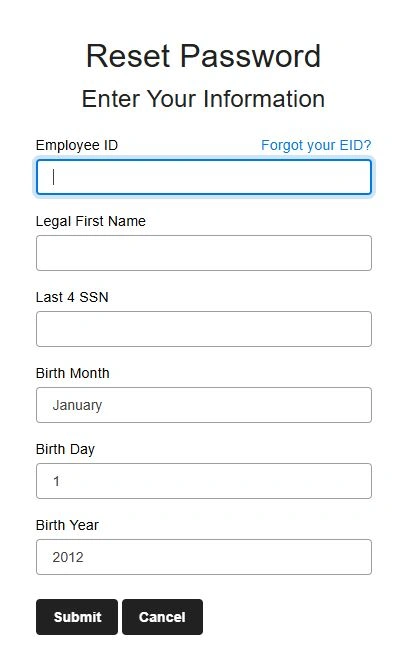
- On the login screen, select Forgot Password.
- Enter your Employee ID, legal first name, last four of your SSN and date of birth.
- Open the reset email from Dollar General and follow the link.
- Create a new password using letters, numbers and a symbol.
Your pay
View and download your paystub
Pay information lives on a different system from the main DGME portal. If your stub is not showing on payday, check again after 10 AM, since the system often updates later in the morning.
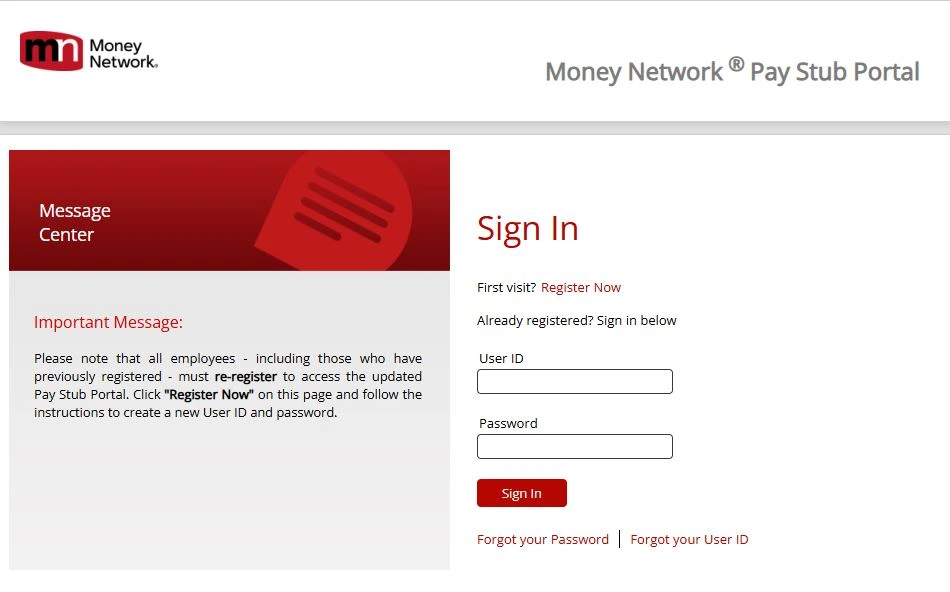
- Go to paystubportal.com/dollargeneral.
- Sign in with your Employee ID and password or PIN.
- Open the Payroll or Pay Stub section.
- Choose the pay period, then view, download or print it.
Tax season
Get your W-2 online
Dollar General releases W2 forms by January 31 each year. If you chose mailed delivery, confirm your address inside the portal is current, because an outdated address delays the paper copy.
- Sign in to the paystub portal.
- Open the Tax Forms or W-2 section.
- Select the tax year you need.
- Download or print the form for filing.
Your shifts
DGME Schedule: Check Your Work Schedule (Legion)
Dollar General manages employee schedules through Legion, a workforce management system connected to the DGME portal. Once you sign in, you can see your upcoming shifts, request time off and pick up extra hours without calling your store.
How to view your schedule:
- Sign in to the DGME employee portal with your Employee ID and password.
- Open the Schedule or Workforce section from your dashboard.
- You will be redirected to Legion, where your current and upcoming shifts appear in a weekly calendar view.
- Tap any shift to see the start time, end time and assigned role.
What you can do in Legion:
| Task | Where to find it |
|---|---|
| View upcoming shifts | Schedule calendar on the home screen |
| Request time off | Time Off or Availability menu |
| Swap a shift with a coworker | Shift Swap option inside the shift details |
| Pick up open shifts | Open Shifts board, subject to manager approval |
Tip: Schedules are usually posted in advance by your store manager. If your upcoming week looks empty, it may simply not be published yet, so check back later or confirm with your manager before assuming there is a login problem.
Trouble seeing your schedule? Make sure you are signing in through the official DGME portal first. If Legion does not load, clear your browser cache or try the mobile app. For access issues, contact your store manager or the DG support line.
On your phone
Using DGME on Your Phone
There are two official ways to use DGME on your phone. Open the web portal in your mobile browser for account and pay tasks, or install the official Workvivo app for company updates and quick access. Dollar General delivers its employee app through Workvivo, so there is no app named simply DGME in the stores, which is why many people think no app exists. A laptop is smoother for downloading pay stubs and W2 forms.
Option 1: The web portal in your browser
This is the same portal you use on a computer, and it handles everything account related.
- Open your mobile browser (Chrome or Safari) and go to webapps.dolgen.net/dgme2.
- Enter your 8 digit Employee ID and password, then complete any security check.
- Tap Sign In to open your dashboard.
- For pay stubs or W2 forms, switch to a laptop if the download buttons do not appear.
Option 2: The official app (Workvivo)
Dollar General delivers its employee app through Workvivo. There is no app named simply “DGME” in the stores, which is why many people think no app exists. Download Workvivo from the App Store or Google Play, sign in with your Employee ID and DGME password, and it opens as DGme. Use it for company updates, announcements and staying connected with your store. Your schedule also shows inside the app, but the full schedule tools like time off requests and shift swaps live in Legion through the web portal. Pay stubs and W2 forms still open on the separate pay stub portal.
Left the company
Former employee access
Left Dollar General but need an old paystub or W-2? You can usually still sign in to the paystub portal with your previous Employee ID and password. If your credentials expired, use Forgot Password and verify with your SSN. For tax season, former employee W-2 access typically opens in late January.
Troubleshooting
Fix the most common login problems
Almost every DGME error falls into one of these buckets. Find the symptom and apply the matching fix.
| Symptom | Most likely cause | What to do |
|---|---|---|
| Employee ID not found | Store has not added you yet | Ask your manager to confirm you are in the system |
| Page will not load | Browser cache or old browser | Clear cache, switch to Chrome or Edge, disable VPN |
| Account locked | Too many wrong attempts | Wait a few minutes, then reset the password |
| No verification code | Email in spam or wrong address | Check spam, confirm your email in the portal |
| Paystub missing on payday | System still processing | Recheck after 10 AM the same day |
How to stay safe from fake DGME sites
Phishing pages copy the DGME look to steal Employee IDs. Four rules keep you safe:
- Only type your login on a dolgen.net page or the official paystub portal.
- Bookmark the correct link so you never search for it again.
- This site never asks for your password. We only point you to the official portal.
- Report suspicious emails to your store manager or HR, not to any third party site.
Explore more DGME guides
Need a specific task? Jump straight to the right guide.
Quick answers