Locked out of your DGME account? You don’t need to wait for HR — this DGME password reset guide shows you how to use the Forgot Password option to recover access in a few minutes, what details you’ll need, and what to do if the reset email doesn’t arrive.
What you need before a DGME password reset
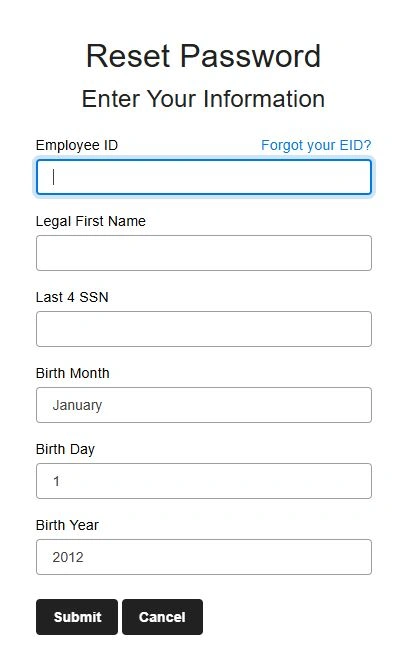
Have these four details ready. The reset page asks for all of them to confirm your identity:
- Your Employee ID (EID)
- Your legal first name
- The last four digits of your Social Security Number (SSN)
- Your date of birth
How to reset your DGME password step by step
- Open webapps.dolgen.net/dgme2 in your browser.
- On the login screen, click the “Forgot Password” link below the sign-in fields.
- Enter your Employee ID, legal first name, last four of your SSN, and date of birth, then click Submit.
- Check your registered email for a reset link from Dollar General.
- Open the link and create a new password using a mix of letters, numbers, and a symbol.
- Return to the login page and sign in with your new password.
Why your DGME password may have stopped working
DGME passwords expire roughly every 90 days for security, so a password that worked last month may simply have timed out. If that’s the case, don’t keep retrying the old one — several failed attempts can temporarily lock your account. Just run the reset instead.
DGME password reset email not arriving?
- Wait 10–15 minutes — reset emails are sometimes delayed by email servers.
- Check your spam or junk folder.
- Confirm the email address on file is current. If it’s outdated, the link can’t reach you, and you’ll need your manager or HR to update it.
- If nothing arrives after a few tries on different days, contact your store manager or HR through official internal channels.
Account locked from too many attempts?
Entering the wrong password several times can temporarily lock your account. Wait about 15 minutes, then reset your password rather than guessing again. If it stays locked, only your store manager or HR can unlock it.
Tips for a strong DGME password
- Use a mix of uppercase, lowercase, numbers, and a symbol.
- Avoid names, birthdays, or simple sequences like 123456.
- Don’t reuse a password from another account.
- Never share your password, and only enter it on dolgen.net — Dollar General will never ask for it by email or phone.