The DGME app is not a standalone application you can find by searching “DGME” in an app store, and that single fact causes most of the confusion around it. Dollar General delivers its mobile employee experience through Workvivo, an employee engagement platform, so the app you actually download is called Workvivo. This guide explains how to install it, sign in with your existing DGME credentials, what the app can and cannot do, and how to fix the errors employees run into most often.
The DGME app runs on the Workvivo platform. Download Workvivo from the App Store or Google Play, sign in with your Employee ID and DGME password, and you get company updates, schedule access, and payroll links on your phone. New employees must complete DGME registration on the web portal first, because the app uses the same credentials.
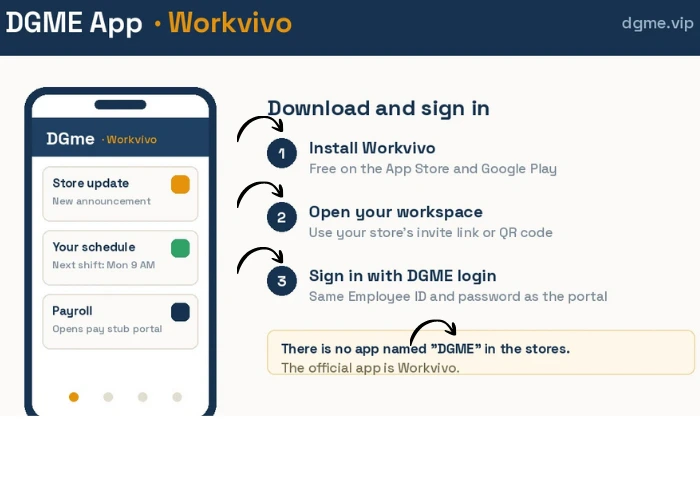
What the DGME app actually is
Dollar General moved its employee communication and mobile experience onto Workvivo, so “DGME app” and “Workvivo” refer to the same thing in practice. Searching an app store for “DGME” or “Dollar General employee” returns either nothing useful or unofficial apps that have no connection to your account, and entering your credentials into one of those is a real security risk. The only app to install is Workvivo, and your login details are the same Employee ID and password you created during DGME registration on the web portal.
Another name that gets mixed up with the DGME app is DG Mobility, an internal store operations system that runs on company devices rather than your phone. If you have heard that term at work, read our DG Mobility guide to understand what it is and what it is not.
How to download and sign in
The whole setup takes a few minutes if your DGME web account already works. Follow these steps:
- Open the App Store (iPhone) or Google Play (Android) and search for Workvivo.
- Install the app. It is free, published by Workvivo, and requires no payment at any point.
- Open the app. If it asks for your organization or workspace, use the invite link or QR code your store shared during onboarding, which opens Dollar General’s workspace automatically. If you were not given one, ask your store manager for the current link.
- Sign in with your Employee ID and your DGME password, the same credentials you use at webapps.dolgen.net/dgme2.
- Allow notifications if you want shift and company announcements to reach you in real time. You can change this later in your phone settings.
What you can do in the app
| Feature | Where it lives | Notes |
|---|---|---|
| FeatureCompany news and updates | Where it livesHome feed | NotesAnnouncements, store communications, and recognition posts appear here first. |
| FeatureSchedule access | Where it livesSchedule or linked scheduling tool | NotesShift details come from Dollar General’s scheduling system. See our DGME schedule guide for the full walkthrough. |
| FeaturePayroll links | Where it livesPayslip or payroll section | NotesPay stubs themselves live on the separate pay stub portal; the app routes you there rather than storing stubs itself. |
| FeatureProfile and notifications | Where it livesProfile settings | NotesUpdate notification preferences and basic profile details from your phone. |
App vs web portal: which one to use
The app is built for staying informed day to day, while the web portal remains the place for account level tasks. As a rule of thumb, anything involving registration, identity details, tax documents, or password recovery belongs on the web portal, and anything involving news, quick schedule checks, and notifications is faster in the app.
| Task | Use the app | Use the web portal |
|---|---|---|
| TaskCheck company updates | Use the appYes, fastest option | Use the web portalPossible but slower |
| TaskFirst time registration | Use the appNo | Use the web portalYes, at webapps.dolgen.net/dgme2 |
| TaskPassword reset | Use the appNo | Use the web portalYes, see our password reset guide |
| TaskW2 forms and pay stubs | Use the appLinks only | Use the web portalYes, on the separate pay stub portal |
Common DGME app problems and fixes
| Problem | Likely cause | Fix |
|---|---|---|
| ProblemLogin fails in the app but works on the web | Likely causeWrong workspace selected, or a cached bad session | FixConfirm you are signing in to Dollar General’s Workvivo workspace, then force close the app and try again. If it persists, delete and reinstall the app. |
| ProblemWorkspace or organization not found | Likely causeTypo in the workspace address | FixUse the invite link or QR code provided during onboarding, or ask your store manager for the current one. |
| ProblemCredentials rejected everywhere | Likely causeExpired or forgotten password | FixReset your password on the web portal first, confirm the new password works on the web, then sign in to the app. |
| ProblemNo notifications arriving | Likely causeNotifications disabled at the phone level | FixEnable notifications for Workvivo in your phone settings, not just inside the app. |
| ProblemApp crashes or shows a blank screen | Likely causeOutdated app version or OS conflict | FixUpdate the app from the store, restart your phone, and reinstall if the problem continues. |