The DGME login is how Dollar General employees reach their work schedule, personal details and HR resources through the official portal on dolgen.net. This guide covers the complete DGME login process with your Employee ID, plus fixes for every common sign in error, so you get in on the first try instead of the fifth.
The official DGME login page is webapps.dolgen.net/dgme2. Sign in with your 8 digit Employee ID and password. Pay stubs and W2 forms use a separate portal, covered below.
Before you start
What you need for DGME login with Employee ID
- Your 8 digit Employee ID (EID). This is your DGME username. New hires receive it from their store manager or HR during onboarding.
- Your password. Created at first time registration, or your most recent reset.
- An updated browser. Chrome or Edge work most reliably with the Dollar General portal. Outdated browsers cause blank pages.
Good to know: DGME passwords expire on a cycle for security. If your DGME login stops working after months of working fine, an expired password is the usual reason, not a wrong Employee ID.
Step by step
DGME login steps, the complete walkthrough
- Open webapps.dolgen.net/dgme2 directly. Type it or use a bookmark instead of searching, because lookalike sites copy the DGME login page to steal credentials.
- Check the address bar. The domain must show dolgen.net. Anything else is not Dollar General.
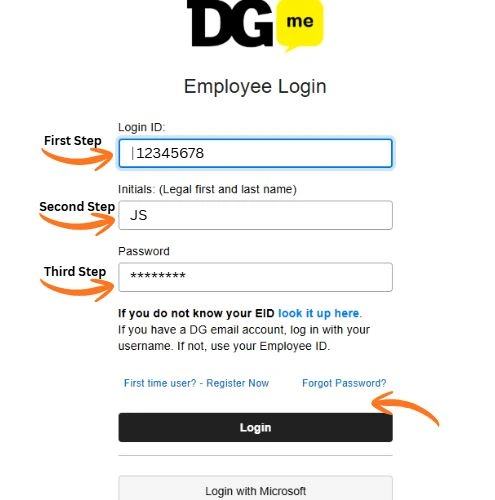
- Enter your 8 digit Employee ID in the first field.
- Enter your password. The field is case sensitive, so check caps lock.
- Complete the security check if one appears. This is normal on a new device.
- Select Sign In. Your dashboard opens with your schedule, profile and HR sections.
Troubleshooting
DGME login not working? Every error explained
| What you see | What it means | What to do |
|---|---|---|
| Invalid Employee ID | Mistyped, or not yet in the system | Recheck all 8 digits. New hires: ask your manager to confirm your record is active. |
| Incorrect password | Wrong or expired password | Try once carefully, then use Forgot Password instead of guessing. |
| Account locked | Too many failed attempts | Wait a few minutes, then reset your password. |
| Blank or frozen page | Browser cache or extension conflict | Clear cache, disable VPN or ad blockers, or use a private window. |
| Security check loops | Cookies blocked | Allow cookies for dolgen.net and reload. |
Locked out completely? Follow the full guide to reset your DGME password, or call the Dollar General Employee Response Center at 1 855 275 3447.
Common situations
DGME login for former employees and new hires
Former employees: your DGME login for the main portal usually ends after you leave, but pay records remain reachable. Use the paystub portal with your old Employee ID to download past pay stubs and W2 forms, especially during tax season. Full details in our former employee access guide.
New hires: your DGME login works only after your store adds you to the system and you complete first time registration. If your Employee ID is not recognized in week one, that setup is likely still in progress. See first time user registration.
Stay safe
Protect your DGME login in 20 seconds
- Bookmark the official DGME login page once, then always use the bookmark.
- Never enter your Employee ID or password on a domain that is not dolgen.net.
- On shared or store computers, use a private window and sign out after.
- If any email asks for your DGME password, report it to your store manager. Dollar General does not ask for passwords by email.
Quick answers